
AI Email Writer vs ChatGPT: What’s the Difference?
Both can draft a work email in seconds, but they are not the same tool. A dedicated AI email writer lives inside your inbox, reads the thread, and matches your voice, while ChatGPT is a general-purpose chatbot you prompt in a separate tab.
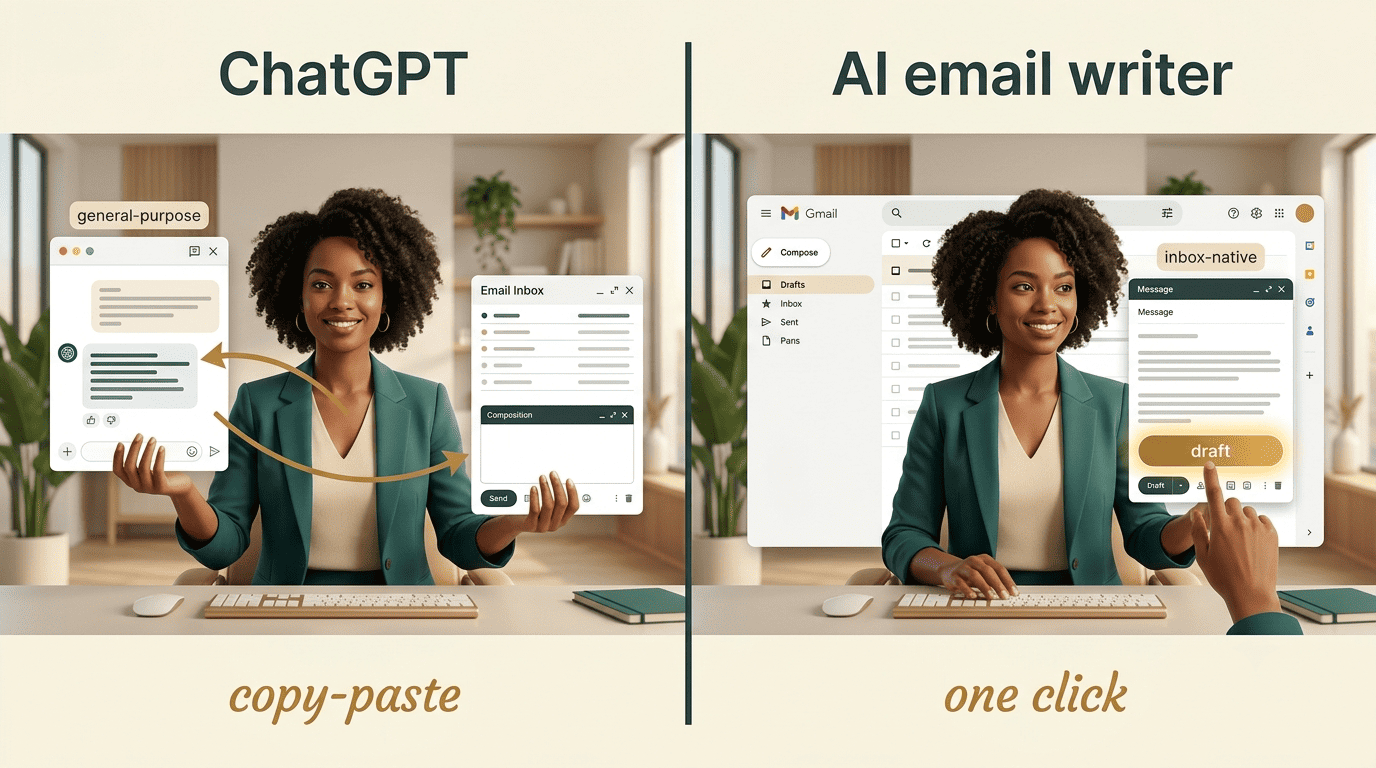
This article breaks the difference down across six concrete points — workflow, context, tone, integration, price, and security — so you can pick the right tool for your inbox.
The Short Answer: Same Engine, Different Job
Roughly 40% of professionals already use AI for email or plan to start soon, and knowledge workers still spend up to 28% of their workweek — around 13 hours — reading, writing, and managing email, according to McKinsey Global Institute research. That gap between adoption and time spent is exactly where the difference between these two tools matters.
What ChatGPT is
ChatGPT is a general-purpose AI chatbot built by OpenAI. It can write almost anything — code, essays, marketing copy, and yes, emails — but email is just one of thousands of use cases it was built for. It has no memory of your inbox unless you paste content into the chat window yourself.
What an AI email writer is
An AI email writer is a purpose-built tool. It ships pre-tuned for subject lines, greetings, sign-offs, and follow-ups, and it runs inside your mail client instead of a browser tab. A dedicated AI email assistant, put simply, is an email writing AI that was designed for one job and does it end to end — draft, tone match, and send.
Difference #1 — Workflow: Copy-Paste vs Inside Your Inbox
Using ChatGPT for email follows the same loop every time:
- Open a new browser tab and switch away from your inbox.
- Copy the thread content and paste it into the chat.
- Write a prompt describing the tone and what you want to say.
- Copy the output back into your mail client and send.
That is three to four manual steps of friction on every single email, and it repeats for every reply you send.
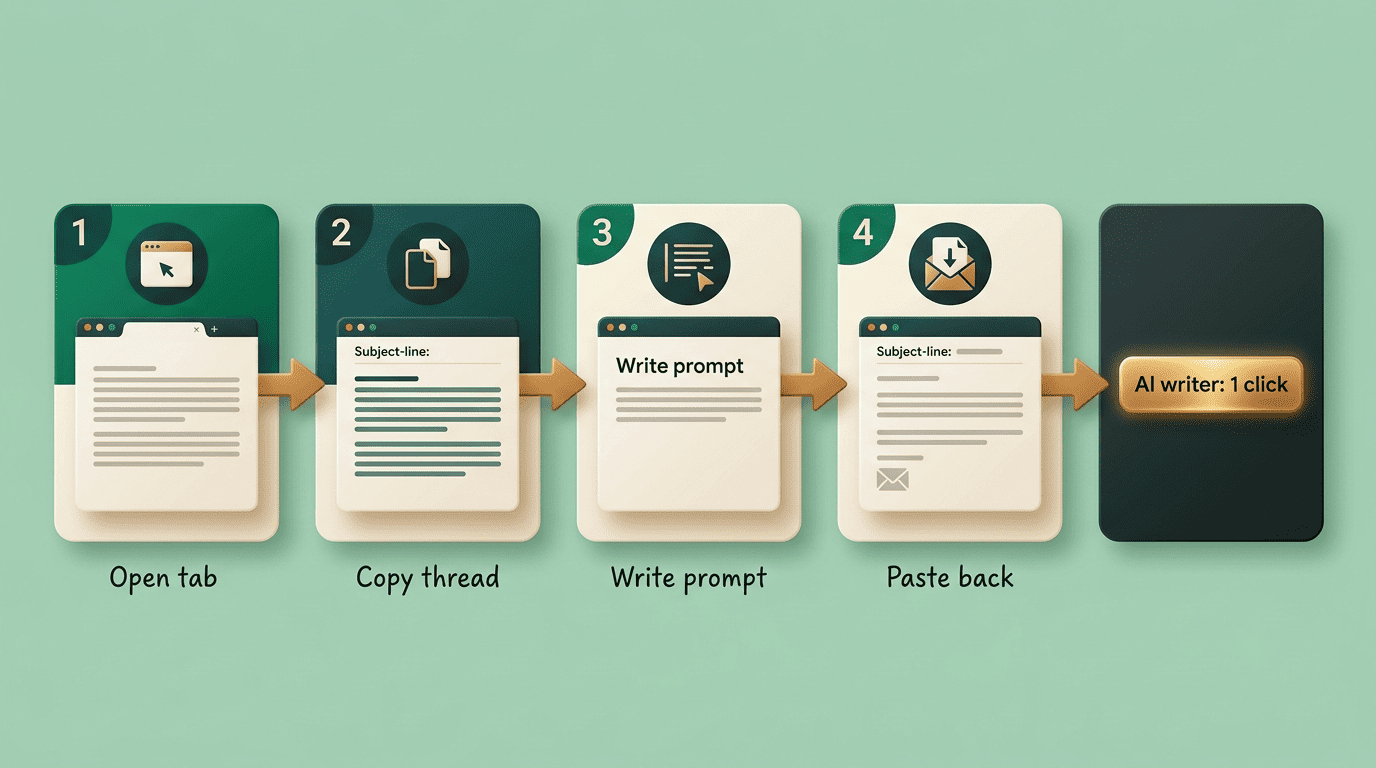
An AI email writer collapses that loop into one action. Because the tool is embedded in Gmail or Outlook, the draft appears as a button next to the message you’re reading — no tab switching, no copying, no pasting a response back into place.
| Step | ChatGPT | AI email writer |
|---|---|---|
| Open the email | In inbox | In inbox |
| Copy thread content | Manual | Not needed |
| Switch to a separate app/tab | Yes | No |
| Write a prompt describing tone/context | Every time | Learned automatically |
| Paste draft back into inbox | Manual | Not needed |
Difference #2 — Context: Does It See the Thread?
ChatGPT only knows what you type or paste into the conversation. It has no default access to your inbox, no memory of the thread history, and no visibility into how you’ve replied to this contact before — unless you copy all of that in manually, every time.

An AI email writer reads the full thread before drafting a reply. Because it’s thread-aware, it can reference earlier messages, avoid misreading forwarded content, and produce a response that actually fits where the conversation left off, not a generic answer built from a fragment you happened to paste.
Difference #3 — Tone and Personalization
Matching your voice separates the two tools most clearly. A dedicated email writer studies your sent folder — typically over two to three days of use — and adapts its drafts to your natural phrasing, greeting style, and sign-off habits without being told. ChatGPT starts from zero on every conversation; you have to describe your tone in the prompt, or set it once in custom instructions and hope it holds.
The «sounds like AI» risk
Most recipients can’t reliably tell AI-written email from a human draft in blind tests — but that doesn’t mean heavy AI use is free. A workplace study found that only 40% of employees viewed heavy AI use in a message as sincere, compared with 83% for messages with light AI assistance.
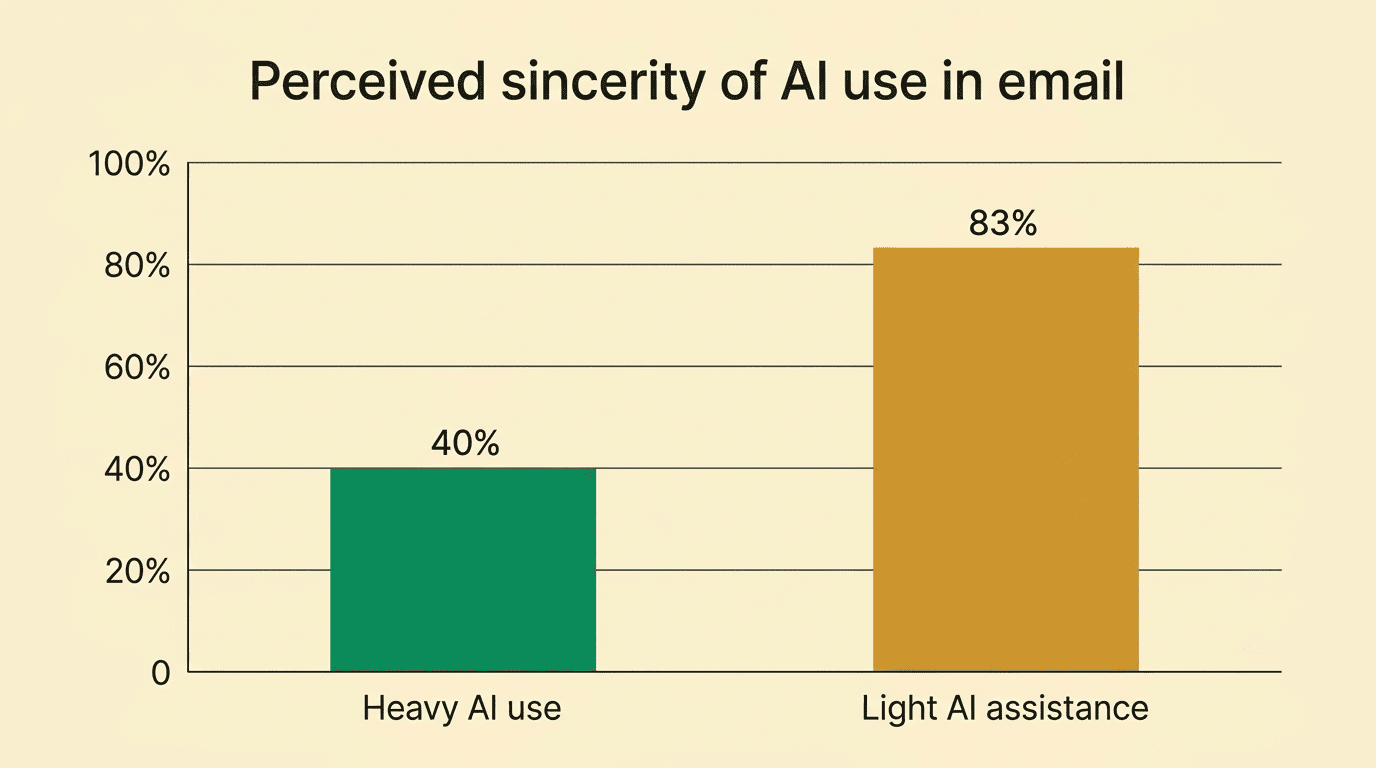
The takeaway is that personalization matters more than raw drafting speed — a fast draft that sounds like nobody wrote it can cost more trust than it saves in time.
Difference #4 — Gmail and Outlook Integration
A dedicated AI email writing tool typically connects natively to Gmail or Outlook through OAuth 2.0, the same authorization standard Google Workspace add-ins and Outlook add-ins use for connecting third-party tools. ChatGPT has no equivalent native integration for either inbox — you’re limited to manual copy-paste unless you build or install a separate browser extension.
OAuth 2.0 is the industry-standard protocol for authorization.
OAuth.net, OAuth 2.0 Framework
- Native Gmail/Outlook connection: standard for dedicated email writers, absent by default in ChatGPT.
- Google’s own Gemini is built into Gmail directly, and Microsoft’s Copilot is built into Outlook — both function as inbox-native alternatives, but neither is ChatGPT.
- OAuth 2.0 authorization means the tool requests specific inbox permissions rather than requiring you to paste raw email content into a third-party chat window.
- Add-in installation for ChatGPT-based workflows usually requires a browser extension built by a third party, not OpenAI itself.
Difference #5 — Pricing
ChatGPT is free to use, with a Plus tier at $20 a month for higher usage limits and newer models. Dedicated email tools price differently — most specialized options run between $5 and $59 a month, and how it works varies within that range.
| Tool | Monthly price | Model |
|---|---|---|
| ChatGPT (free) | $0 | General-purpose, usage caps |
| ChatGPT Plus | $20 | General-purpose, higher limits |
| Lavender | From $29 | Email-specific coaching |
| Superhuman | $30-40 | Inbox client + AI drafting |
The cheapest way to get started is ChatGPT, but every email still costs you the copy-paste tax described in Difference #1. A paid, specialized tool costs more per month but removes that friction on every message you send.
Difference #6 — Privacy and Security
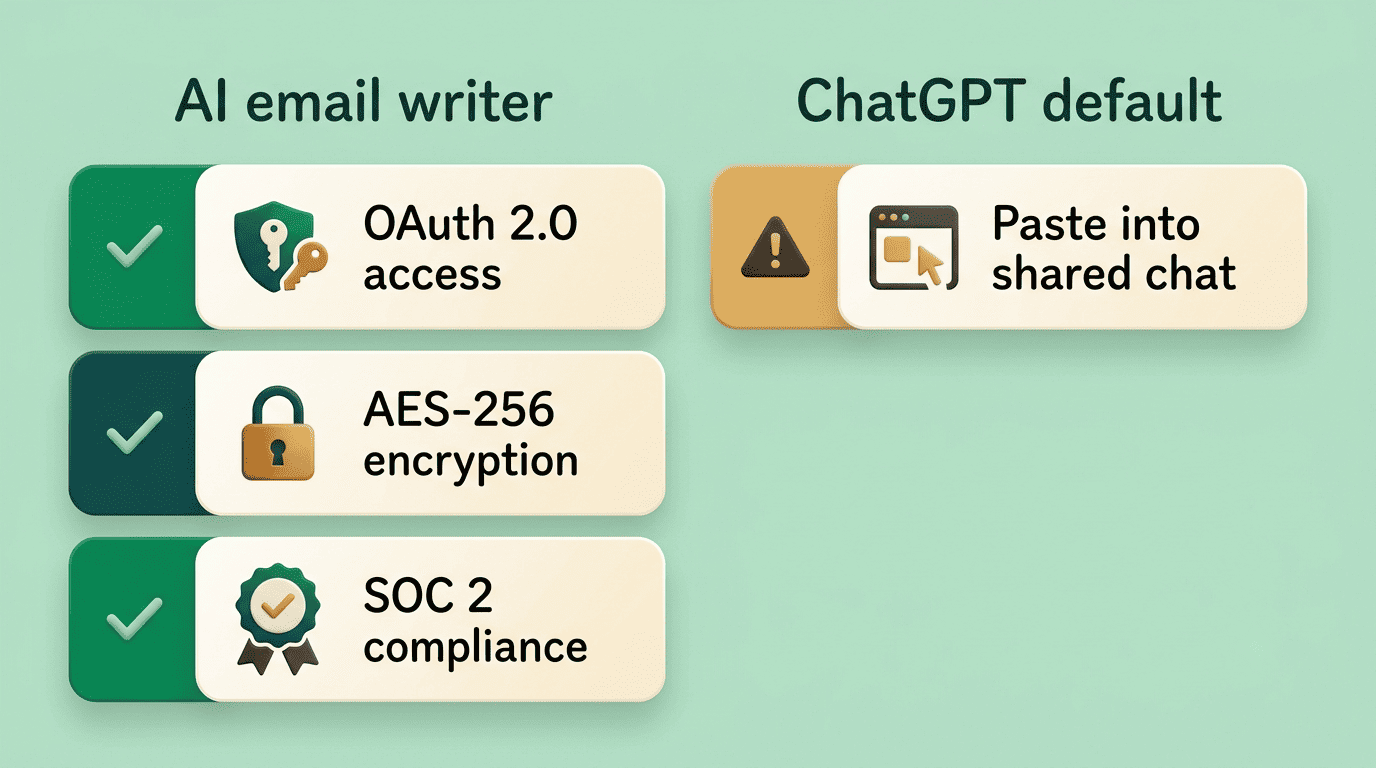
Specialized email tools generally rely on a combination of security measures for how they store and process messages:
- OAuth 2.0 for scoped, revocable inbox access instead of a shared password.
- AES-256 encryption for stored message data.
- SOC 2 compliance covering how the vendor handles and audits customer data.
ChatGPT’s default setup works differently: you’re pasting email text into a shared chat interface, which raises separate questions about what happens to that data — OpenAI documents its handling of business data in its enterprise privacy policy.
AI-generated text also carries statistical fingerprints — detection tools like GPTZero and Copyleaks flag machine-written content by measuring signals such as perplexity and burstiness (how predictable and how varied the sentence structure is), not by reading the content itself. None of that makes either tool insecure by default, but the two approaches to handling your email data are not interchangeable, and it’s worth knowing which one you’re using before you paste in anything sensitive.
Which Should You Choose?
Here’s a quick way to decide:
- Count how many emails you draft per week. Under 10? ChatGPT’s free tier is probably enough.
- If you’re drafting 20+ replies a week inside the same two or three threads, the copy-paste tax from Difference #1 starts costing more time than a paid tool would.
- Check whether your replies depend on thread history. If recipients expect you to reference earlier messages, thread-aware tools win outright.
- Weigh tone risk. If your emails go to clients or leadership, the sincerity gap from Difference #3 matters more than raw drafting speed.
- Decide on data sensitivity. If you’re pasting confidential deal terms or HR details into a shared chat window, an inbox-native, OAuth-secured tool is the safer default.
- Test the hybrid approach for two weeks before committing to either tool exclusively.
| Choose this if… | Best fit |
|---|---|
| You write emails rarely and want a free option | ChatGPT |
| You need long-form drafts written from scratch, no thread context | ChatGPT |
| You reply inside the same threads daily and want one-click drafts | Dedicated AI email writer |
| You need the tool to learn your tone automatically | Dedicated AI email writer |
| Budget is the only constraint | ChatGPT free tier |
Many teams end up running both. ChatGPT — or a comparable model like Claude — handles drafts written from a blank page, cold outreach, or longer strategic messages where there’s no existing thread to read. A dedicated AI email assistant then takes over for day-to-day replies inside existing conversations, where thread awareness and tone matching do the heavy lifting. If your inbox is the bottleneck, a purpose-built assistant designed for that workflow will save more time than a general chatbot ever will.
FAQ
Related guides: a free AI email writer with no signup and getting the tone right.