
AI Email Writer for Professional Work Emails: Sound Sharp, Send Faster
Staring at a blank compose window before a client email costs more time than the email itself. A professional AI email writer fixes that: describe the situation and recipient, pick a formality level, and it returns a business-ready draft you refine and send.
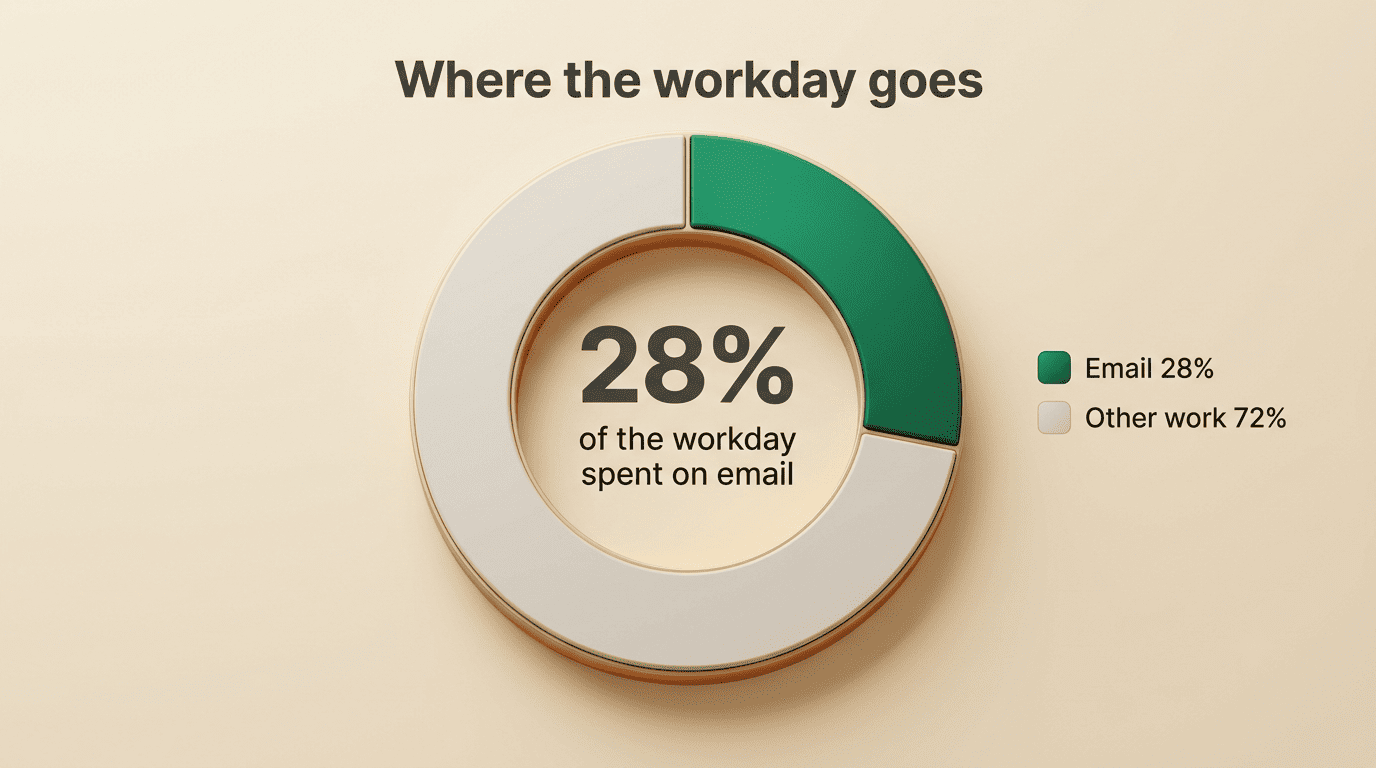
Work email is where the time goes: McKinsey’s research puts the average professional at 28% of the workday reading and answering email. An AI email writing tool turns that blank-page stall into a first draft you can trust for the routine share of your inbox — freeing up hours for the messages that actually need your judgment.
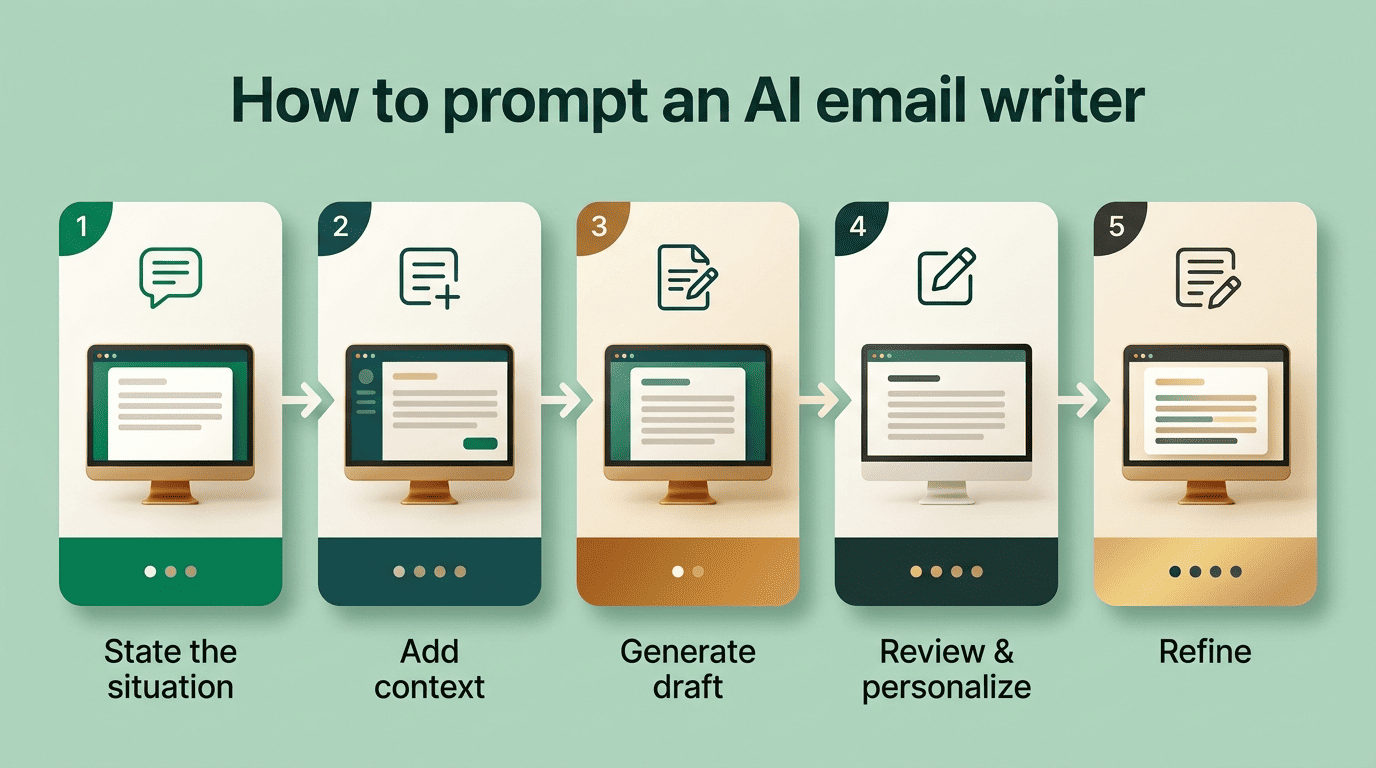
How to Use an AI Email Writer for Work Emails
Most tools in this category, from integrated inbox assistants to standalone web apps, converge on the same working method: give the model a situation, add detail, review, then iterate. The underlying engine is usually a GPT-class large language model, which is why a specific, complete prompt beats a vague one — the AI email assistant can only work with what you hand it.
The prompt framework
Follow this five-step loop each time you draft a work email with an AI email writer:
- State the situation. Open with a plain-language brief — «Write a polite follow-up after a client call» — so the model knows the email’s purpose before anything else.
- Add context. Name the recipient and your relationship to them, the tone you want, a target length, and the two or three points that must appear.
- Generate the draft. Let the AI email writing tool produce a full email, not just a paragraph — subject line included.
- Review and personalize. Read the draft for accuracy and add one detail only you would know, so it doesn’t read as generic.
- Refine with follow-up commands. Ask for adjustments in plain language — «make this shorter,» «sound more confident» — instead of rewriting from scratch.
One rule is worth keeping regardless of tool: put every detail into a single prompt, since many AI email assistants treat each new message as a fresh session with no memory of the last one. The GPT models that power most of these assistants respond far better to one dense, specific instruction than to a back-and-forth of partial ones.
What to put in the prompt
A prompt for a professional email should specify:
- The recipient and your relationship to them (client, manager, new contact)
- The one outcome you need — a reply, a decision, a confirmation
- Any deadline or date that has to appear in the body
- The tone: formal, warm, direct, persuasive
- Whether you want a subject line generated too
The more of these five you supply up front, the less editing the output needs afterward.
Getting the Professional Tone Right
The single biggest mistake in AI-assisted work email is register, not content — a technically correct draft that lands in the wrong tone still misses. Tone-aware AI email writers expose distinct settings so you can dial formality up or down without starting over.
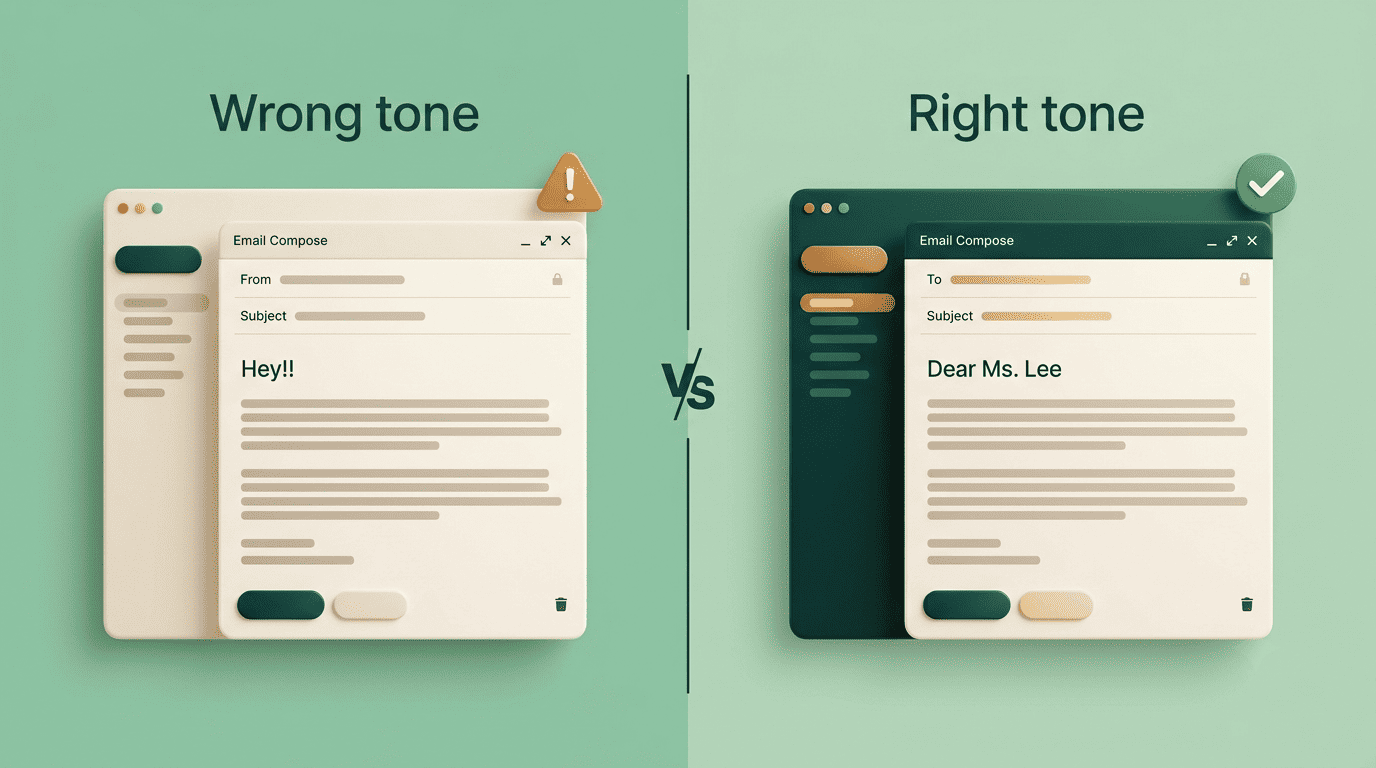
Friendly. A warmer, first-name register for close colleagues and long-standing contacts, where over-formality would feel stiff.
Formal. The default for executives, clients, and anyone you’re emailing for the first time — full names, no contractions, complete sentences.
Persuasive. Built for pitches, proposals, and requests where you need the reader to say yes, with the ask stated early and backed by a reason.
Casual. Short, conversational, closer to how you’d speak — reserved for internal quick-turnaround messages, not client-facing threads.
Some tools let you combine settings, asking for a draft that’s «polite but direct» and capping it at a word count, such as under 80 words for a short update. The table below maps tone to the recipient it usually fits.
| Recipient | Recommended tone | Typical length |
|---|---|---|
| Executive or new client | Formal | 100-150 words |
| Existing client, vendor | Polite but direct | Under 150 words |
| Manager, cross-team peer | Formal to friendly | 80-120 words |
| Close colleague | Casual | Under 80 words |
| Prospect (cold outreach) | Persuasive | 100-130 words |
Matching tone to audience, not to topic, is what makes a drafted email read as if a person — not a script — wrote it.
The Structure a Professional Email Should Follow
An AI draft is only as credible as the shape it’s poured into. Professional email etiquette guidance, including Purdue OWL’s business-writing resources, consistently points to the same skeleton — and a good AI email writer should be instructed to follow it every time.
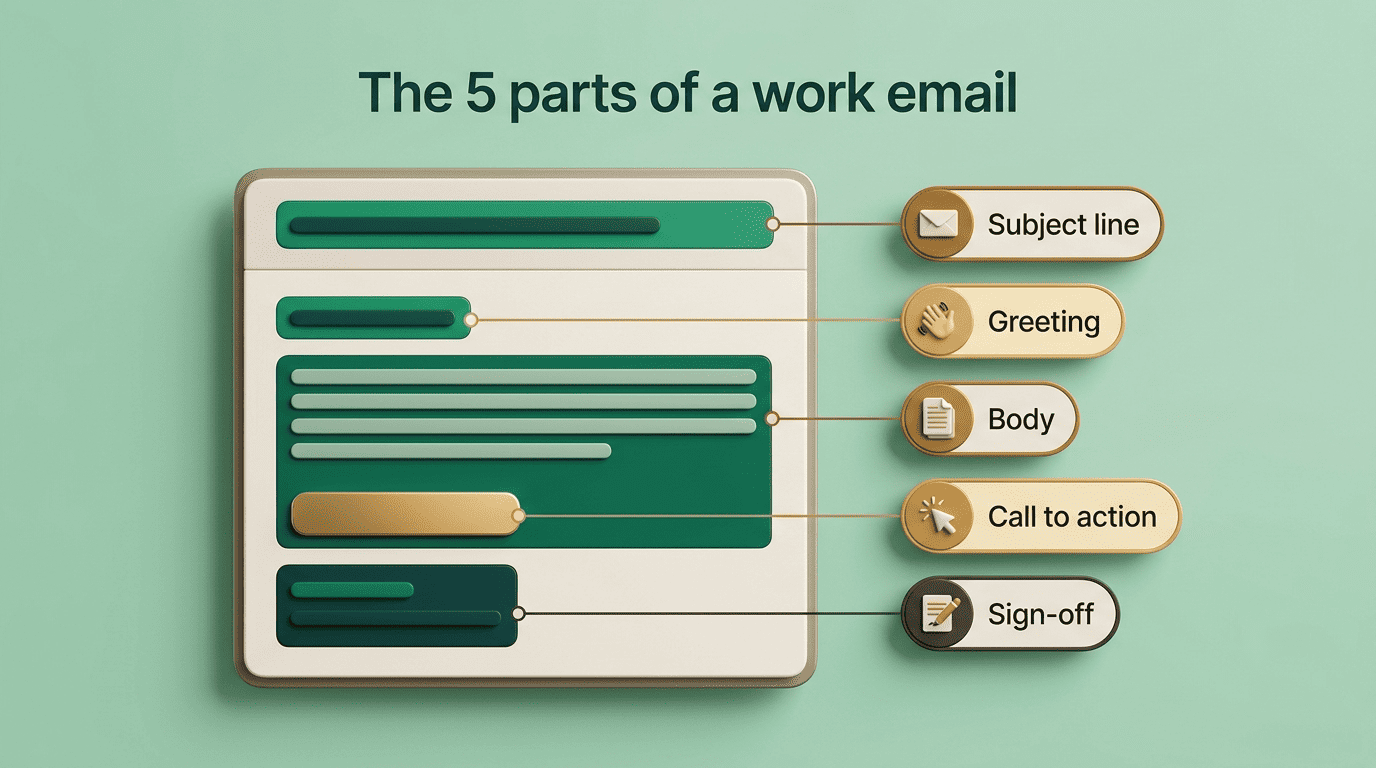
The five parts of a work email
- Subject line — specific and under roughly 10 words, so it’s scannable in a crowded inbox.
- Greeting — a proper «Dear» or «Hello [Name],» never an opener like «Hey» or «Hi there» for a first professional contact.
- Body — leads with the purpose in the first two sentences, then uses short 2-3 sentence paragraphs or bullet points for supporting detail.
- Call to action — one clear ask, with a bolded deadline if timing matters.
- Sign-off — a full closing line and signature block, not a bare name.
Why the skeleton matters more than the wording
A reader scanning a work inbox decides in seconds whether an email needs immediate attention. Short paragraphs, a bolded deadline, and one visible action item let that decision happen at a glance instead of requiring a full read-through. When you prompt an AI email writer to follow this five-part structure explicitly, it stops producing dense blocks of text and starts producing something a busy recipient can act on without re-reading it.
Free vs Paid: Choosing a Business AI Email Tool
Free web-based tools cover most day-to-day email needs with no account required. Paid, integrated tools earn their price when email volume, compliance, or multilingual teams enter the picture.
What each tier gives you
Free tools draft professional emails with no sign-up and typically support English, Spanish, French, German, and a handful of other languages — plenty for occasional work email. Paid business tools add depth: an integrated assistant working inside Outlook and Gmail, support for 18 or more languages, multiple draft variations returned at once, and compliance certifications like SOC 2 Type II, GDPR, and HIPAA that regulated teams require before they’ll let any tool touch client correspondence. Pricing for the paid tier commonly starts in the low single digits per user, per month.
| Free tier | Paid business tier | |
|---|---|---|
| Sign-up required | No | Yes |
| Languages | ~5 | 18+ |
| Drafts per prompt | 1 | Multiple |
| Inbox integration | Web app only | Outlook + Gmail |
| Compliance (SOC 2/GDPR/HIPAA) | Rarely | Common |
Keeping your own voice
An AI draft is a starting point, not a final answer — sending it unedited risks reading as generic at best and as borrowed text at worst. Some paid tools learn your writing style over repeated use, but the fastest fix is manual: add one specific detail the model couldn’t have known before you hit send.
When Not to Use an AI Email Writer
Email is a wonderful thing for people whose role in life is to be on top of things. But not for me; my role is to be on the bottom of things.
Donald Knuth
Knuth’s line is a reminder that email, AI-drafted or not, still runs on human judgment about what deserves a reply and how fast. A model can produce the words; it can’t verify the facts inside them or judge what shouldn’t be said at all.

Review, and know the limits
Always proofread an AI draft for names, dates, and figures the model had no way to verify — it will write a confident sentence around a placeholder or a guess just as easily as around a fact. According to Harvard Business Review’s guidance on email time management, the fix for inbox overload is spending less time per message, not skipping the review step — speed and accuracy aren’t the same trade-off.
Skip an AI email writer entirely for messages in these categories, where nuance and liability outweigh speed:
- Legal correspondence or anything with contractual language
- Medical or health-related communications
- Financial disclosures or figures that must be exact
- HR matters — performance, discipline, compensation
- Confidential or classified business information
For everything else, use the AI email writer for tone and structure, and reserve your own judgment for what the message actually says. When work data is involved at all, favor tools that publish clear privacy terms and carry recognized compliance certifications.
FAQ
Related guides: getting the tone right and using it in Gmail and Outlook.