
AI Email Writer and Email Deliverability: Staying Out of Spam
A perfectly written email is worthless if it lands in the spam folder. An AI email writer handles the content half of deliverability — clean subject lines, no trigger words, balanced structure — but reaching the inbox also depends on technical setup you configure once and reputation you build over time.

Spam filters weigh three things: authentication, sender reputation, and content. Get all three right and your email lands; miss one and it disappears without a bounce notice. This guide covers all three, and where an AI email writing tool fits into each.
Why Good Emails Still End Up in Spam
Sending an email and having it delivered are two different events, and the gap between them is bigger than most senders assume.
Deliverability is not the same as «sent»
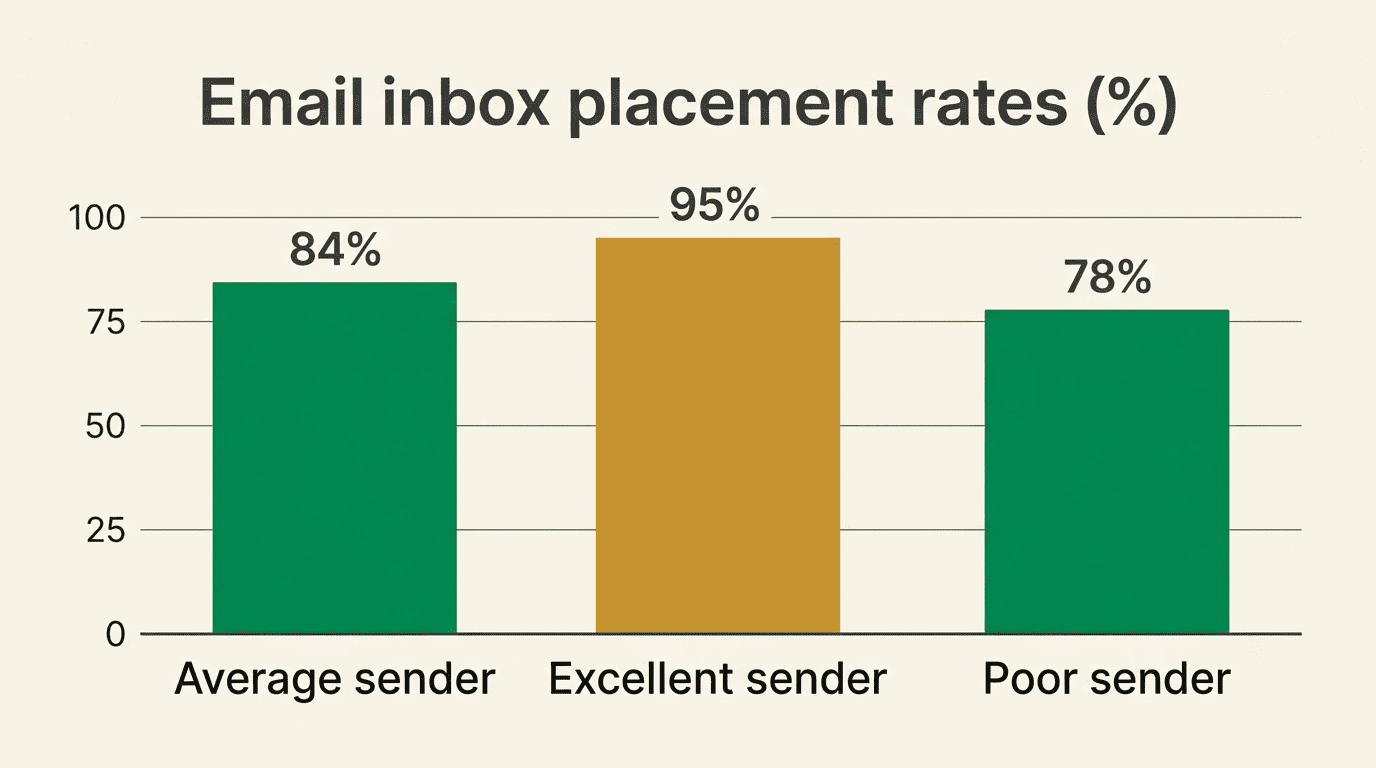
Even legitimate senders see an average inbox placement rate around 84% (Validity, 2025) — roughly one in six emails misses the inbox entirely, landing in spam or nowhere at all. Deliverability measures whether the message actually reaches the inbox, not whether it left your outbox without an error. A sender with clean infrastructure and engaged recipients can push placement above 95%; a sender who ignores any of the three pillars below often sits well under 84%.
Spam filters score three things
Filters weigh authentication (is the sender who they claim to be?), reputation (do recipients actually want this sender’s mail?), and content (does the message look spammy?). An email writing AI can fix the content signal on every send, but all three have to pass — a beautifully written email from an unauthenticated domain with a poor reputation still gets filtered.
| Signal | What it measures | Who controls it |
|---|---|---|
| Authentication | SPF, DKIM, DMARC records prove the domain owns the message | IT/domain admin, set once |
| Reputation | Complaint rate, bounce rate, engagement history | Built over weeks by list quality |
| Content | Trigger words, structure, image ratio, subject line | An AI email writer, on every send |
The Two Halves of Deliverability: Setup and Content
Deliverability splits cleanly into two categories that behave very differently, and mixing them up is the most common reason senders fix the wrong problem first.
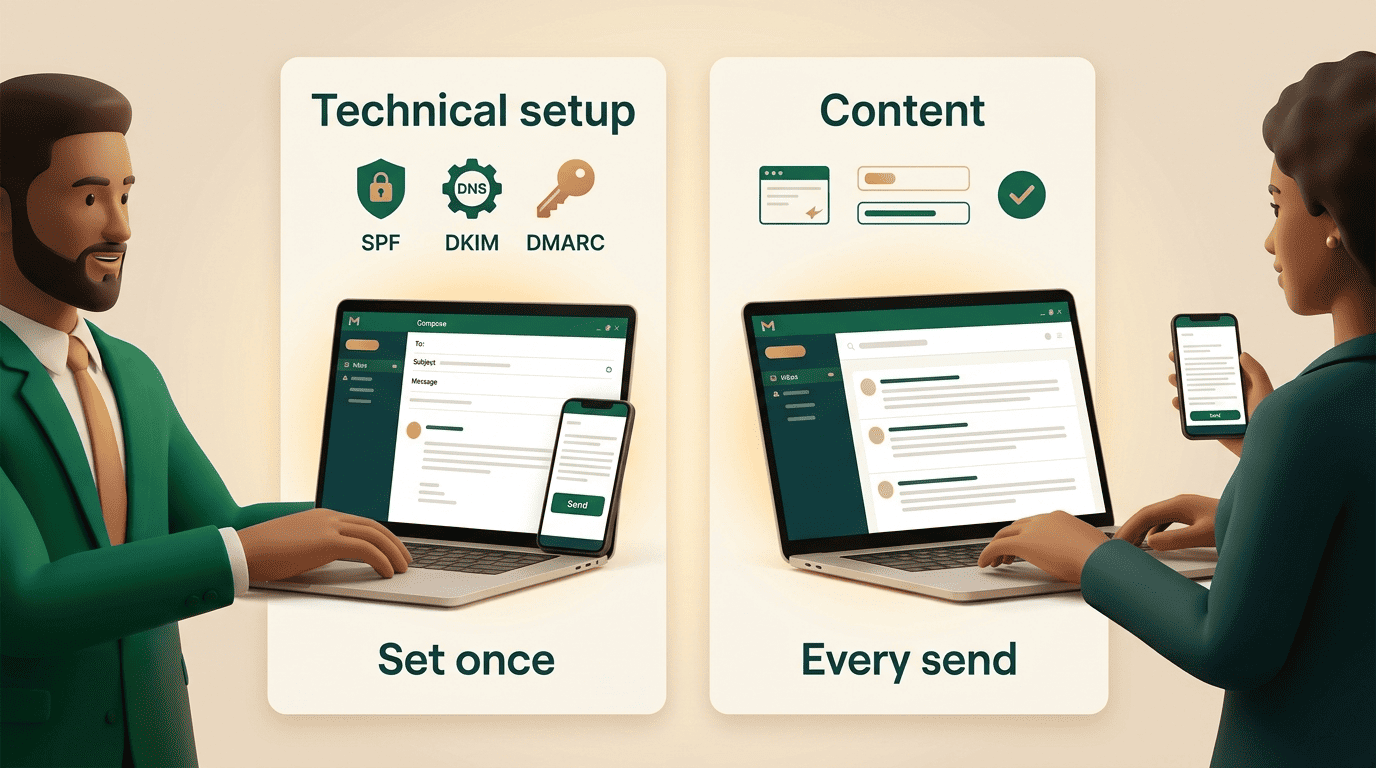
The one-time technical setup. Authentication and sending infrastructure are configured once per domain and then mostly left alone — SPF and DKIM records, a DMARC policy, a warmed-up IP or subdomain. This is the half most senders neglect, because it lives in DNS settings rather than in the email itself, and nobody revisits it until placement drops.
The per-email content half. Every message you send is judged fresh on its words, links, and structure, regardless of how solid the technical setup is. This is where an AI email writing tool works — on the part of deliverability you touch every single time you hit send, catching trigger words and structural red flags before they ever reach a filter.
Email Authentication: SPF, DKIM, and DMARC
Authentication is the foundation everything else sits on; without it, reputation and content quality barely matter.
What each record does
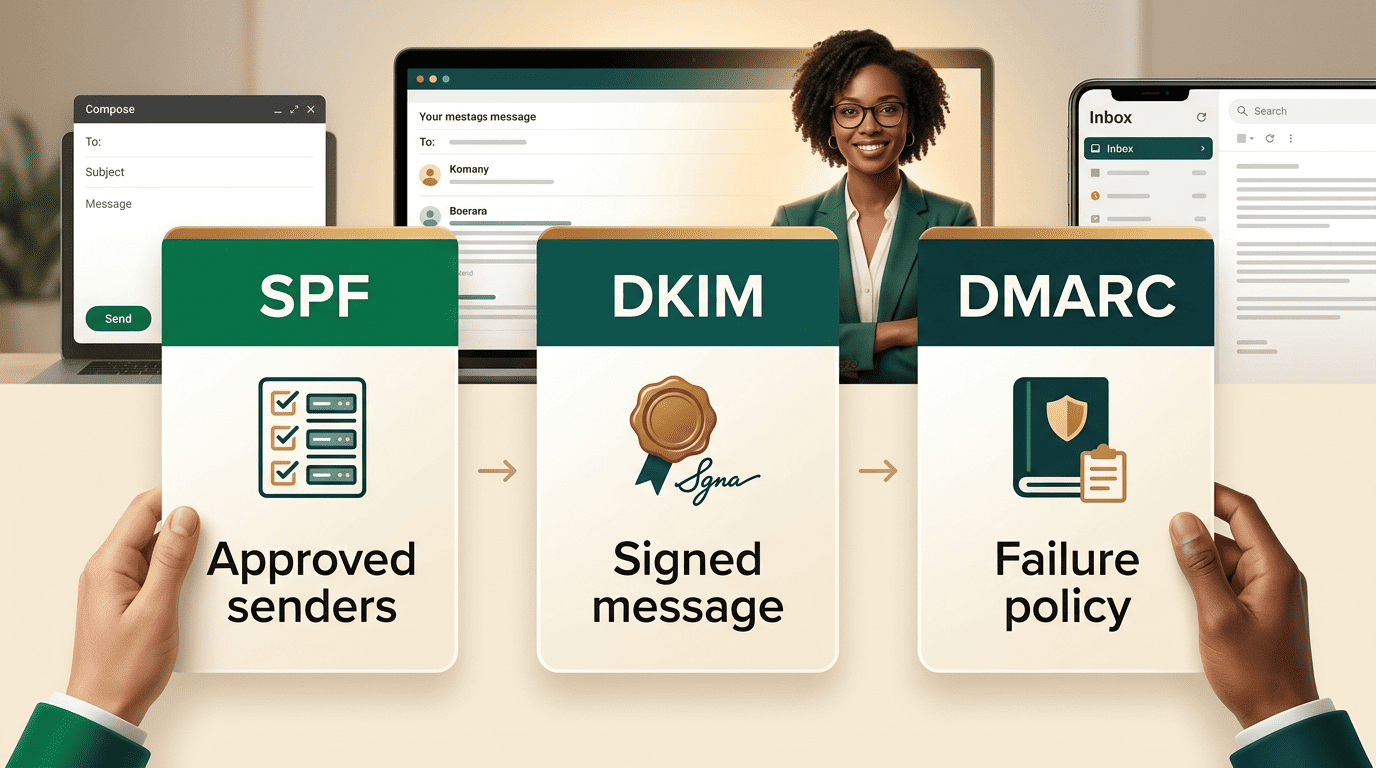
SPF lists which servers are allowed to send mail for your domain, DKIM cryptographically signs each message so receivers can verify it wasn’t altered in transit, and DMARC tells receiving servers what to do if the first two checks fail. Per Google’s sender guidelines, every sender needs SPF or DKIM at minimum, and senders of 5,000 or more messages a day to Gmail addresses need both plus a published DMARC policy.
| Record | Function | Required for |
|---|---|---|
| SPF | Authorizes which mail servers may send for the domain | All senders (or DKIM) |
| DKIM | Cryptographically signs messages to prove they weren’t altered | All senders (or SPF); mandatory for bulk |
| DMARC | Tells receivers what to do when SPF/DKIM checks fail | Bulk senders (5,000+/day) |
Enforcement got serious
Since November 2025, Gmail issues permanent rejections — not just spam-foldering — for mail that fails authentication or exceeds spam thresholds, which means a misconfigured record can bounce mail outright instead of quietly burying it. TLS encryption and a valid reverse DNS (PTR) record matching the sending IP are required for every sender, not just bulk ones. DKIM keys of at least 2048 bits are recommended over the older 1024-bit standard.
Sender Reputation and the 0.3% Spam-Rate Rule
Reputation is the slowest-moving of the three pillars and the hardest to repair once damaged.
Keep complaints under 0.3%
Gmail requires a spam-complaint rate below 0.3% at all times, and ideally under 0.1% for consistent inbox placement. Cross the 0.3% threshold and even fully authenticated mail can be rejected or routed to spam. Monitor complaint and spam rates directly with Google Postmaster Tools, which reports domain-level reputation data Gmail doesn’t expose anywhere else.
Reputation is built slowly
A new sending domain or IP should be warmed up gradually rather than sent to full volume on day one:
- Weeks 1-2: 50-100 emails a day, sent only to the most engaged contacts.
- Weeks 3-4: double volume every few days as opens and clicks stay healthy.
- Weeks 5-6: scale toward full sending volume, watching bounce and complaint rates.
A bounce rate above 5% signals a dirty list and drags reputation down fast, since bounces and complaints both feed the same sender-score calculation.
As the Federal Trade Commission’s CAN-SPAM guidance puts it in its compliance summary for commercial senders:
Each separate email in violation of the CAN-SPAM Act is subject to penalties of up to $53,088.
Federal Trade Commission, CAN-SPAM Act Compliance Guide
So noncompliant sending practices carry real financial risk beyond just poor deliverability. That penalty exposure is separate from deliverability, but the two overlap in practice: senders who ignore opt-in and unsubscribe rules tend to rack up complaints, and complaints are what tank sender reputation fastest.
How an AI Email Writer Keeps Your Content Out of Spam
Content is the signal you control on every single send, and it’s also the easiest to get wrong under deadline pressure.
It avoids the words and patterns filters punish
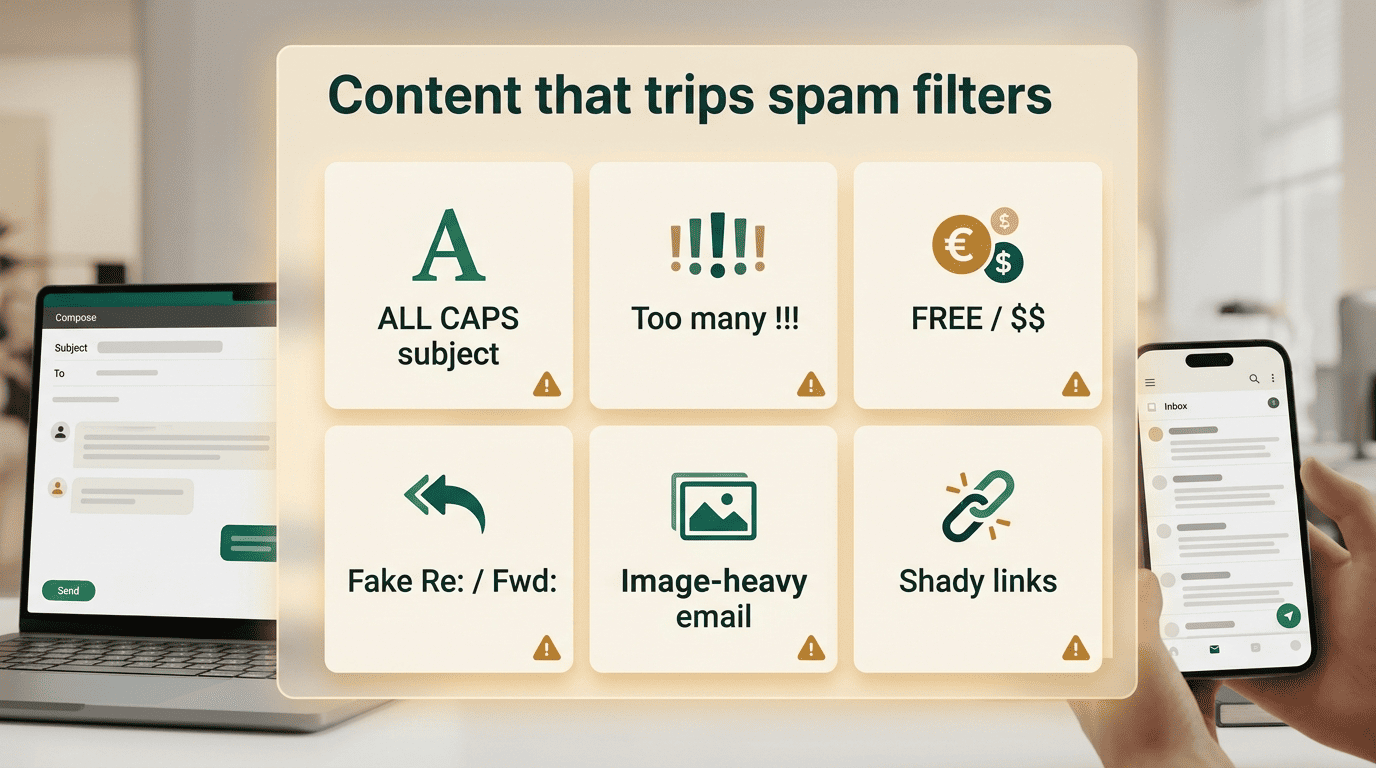
An AI email writer flags trigger words like «free,» «claim,» and «guaranteed,» strips ALL-CAPS and excessive punctuation, and keeps subject lines clean of spam patterns like «$$$» or misleading urgency. It also keeps copy concise, since short, relevant messages read as human rather than templated blasts. Words and phrases worth watching for:
- «Free,» «act now,» «limited time,» «guaranteed»
- «Congratulations,» «you’ve been selected,» «claim your»
- Excessive exclamation points or ALL-CAPS subject lines
- Misleading «Re:» or «Fwd:» prefixes on a first-touch email
- Dollar signs or percentage symbols stacked in a subject line
It structures the message the way filters expect
A healthy image-to-text ratio — roughly 60% text to 40% image — keeps a message from reading as an image-only promo, which is a common spam pattern. No URL shorteners, since they obscure the destination filters try to evaluate, and a plain-text version alongside the HTML version both help. An email writing AI produces balanced, readable content by default instead of the image-heavy layout that trips content filters.
List Hygiene, Opt-In, and Engagement
The list you send to shapes reputation as much as anything you write in the email itself. Four habits do most of the work:
- Double opt-in confirms genuine interest. A second confirmation step after signup filters out mistyped addresses, bots, and spam traps before they ever land on your active list.
- Regular list cleaning removes dead weight. Addresses that haven’t opened or clicked in six months or more drag down engagement metrics that providers use to judge whether your mail is wanted.
- Sunsetting inactive contacts protects the rest of the list. A shrinking-but-engaged list beats a large-but-cold one every time a filter scores reputation.
- Engagement is reputation you earn, not request. Opens, clicks, and replies tell mailbox providers your mail is wanted; forwards and «move to inbox» actions carry even more weight, since they’re an explicit signal from the recipient.
One-Click Unsubscribe and the 2026 Bulk Rules
Making it easy to leave is counterintuitive advice for anyone worried about list size, but it’s the rule with the clearest evidence behind it.
Make leaving easy
Bulk senders — generally defined as 5,000 or more messages a day to Gmail — must support one-click unsubscribe under RFC 8058, the technical standard for a single-click List-Unsubscribe header, and process removal requests within two business days. A visible unsubscribe link in the email body is also expected alongside the header-based mechanism. Easy unsubscribes lower complaint rates, because a frustrated recipient who can’t find an unsubscribe link marks the message as spam instead — and that complaint counts against the 0.3% threshold in a way a clean unsubscribe never does.
A 6-step deliverability check before your next campaign
- Confirm SPF and DKIM are published and passing for your sending domain.
- Publish a DMARC policy, starting at
p=nonefor monitoring before enforcingp=quarantineorp=reject. - Check your current spam-complaint rate in Google Postmaster Tools and confirm it’s under 0.3%.
- Run your draft through an AI email writer to catch trigger words, ALL-CAPS, and image-heavy layout.
- Verify a working one-click unsubscribe link is present in both the header and the body.
- Segment out contacts with no opens or clicks in the last 90-180 days before you send.
FAQ
Related guides: subject lines that get opened and using it in Gmail and Outlook.